Shared Workflow — Stages 0–2
This page covers everything both recovery modes share: Resolve export, Nuke project setup, dataset curation, alignment, shared crop, and the branch decision. Follow this page first, then continue in the guide for your chosen branch.
- Chroma Recovery — when detail is intact but color is faded, collapsed, or shifted.
- Spatial Recovery — when color is acceptable but detail, sharpness, or grain are weaker than the reference.
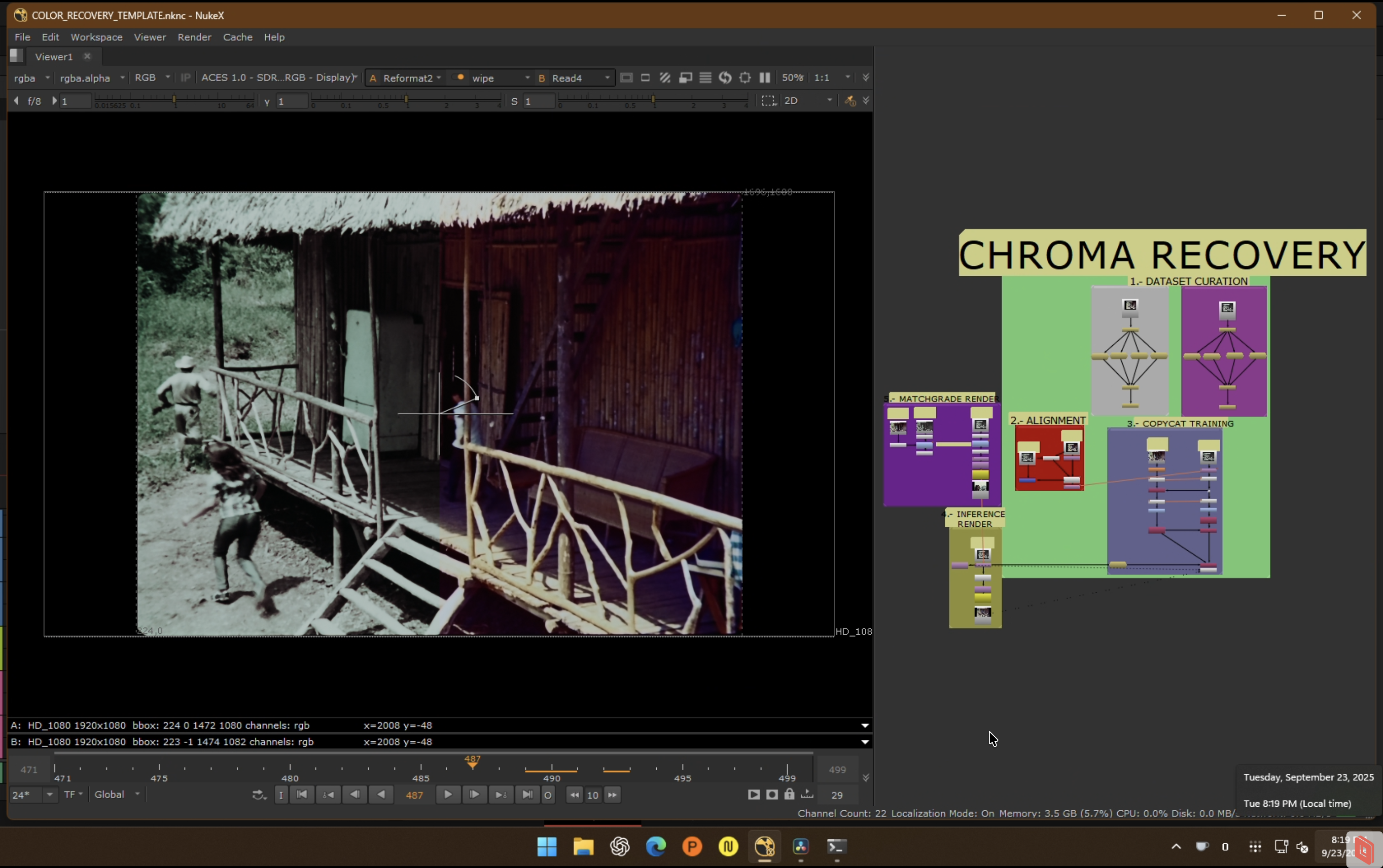 End-to-end overview of the recovery workflow.
Stage 0: Resolve Export + Nuke Project Setup
Source and Reference Preparation
What matters is whether the reference preserves better information for the problem you are solving — not whether it is newer, sharper, or higher resolution.
 Source that should be technically balanced before training.
 Balanced source plate used as cleaner input to the workflow.
Source preparation:
- Technically balance the source (neutral, not creative).
- Remove severe flicker, dirt, splice flashes, and instability that would poison training.
- For chroma recovery: degrain the source for training if grain interferes with chroma learning. Document settings and keep the original plate.
- For spatial recovery: preserve original grain structure — do not degrain unless the reference is also degrained.
- Global cast neutralization: if the source has a strong bias from dye fade or scanning, apply a neutral pre-balance. Recommended: Faded Balancer DCTL/OFX.
| Before (raw faded scan) | After (Faded Balancer applied) |
|---|---|
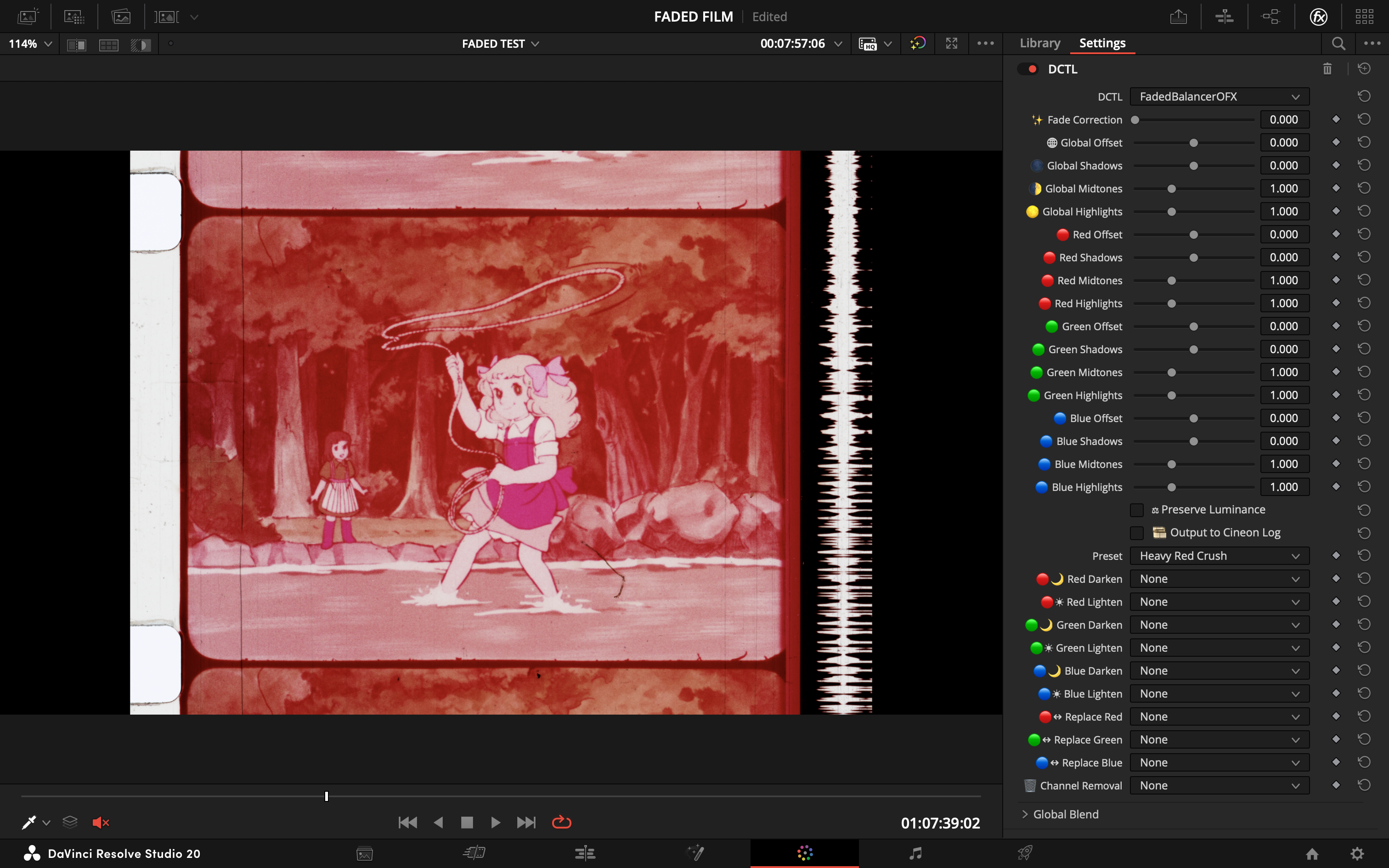 | 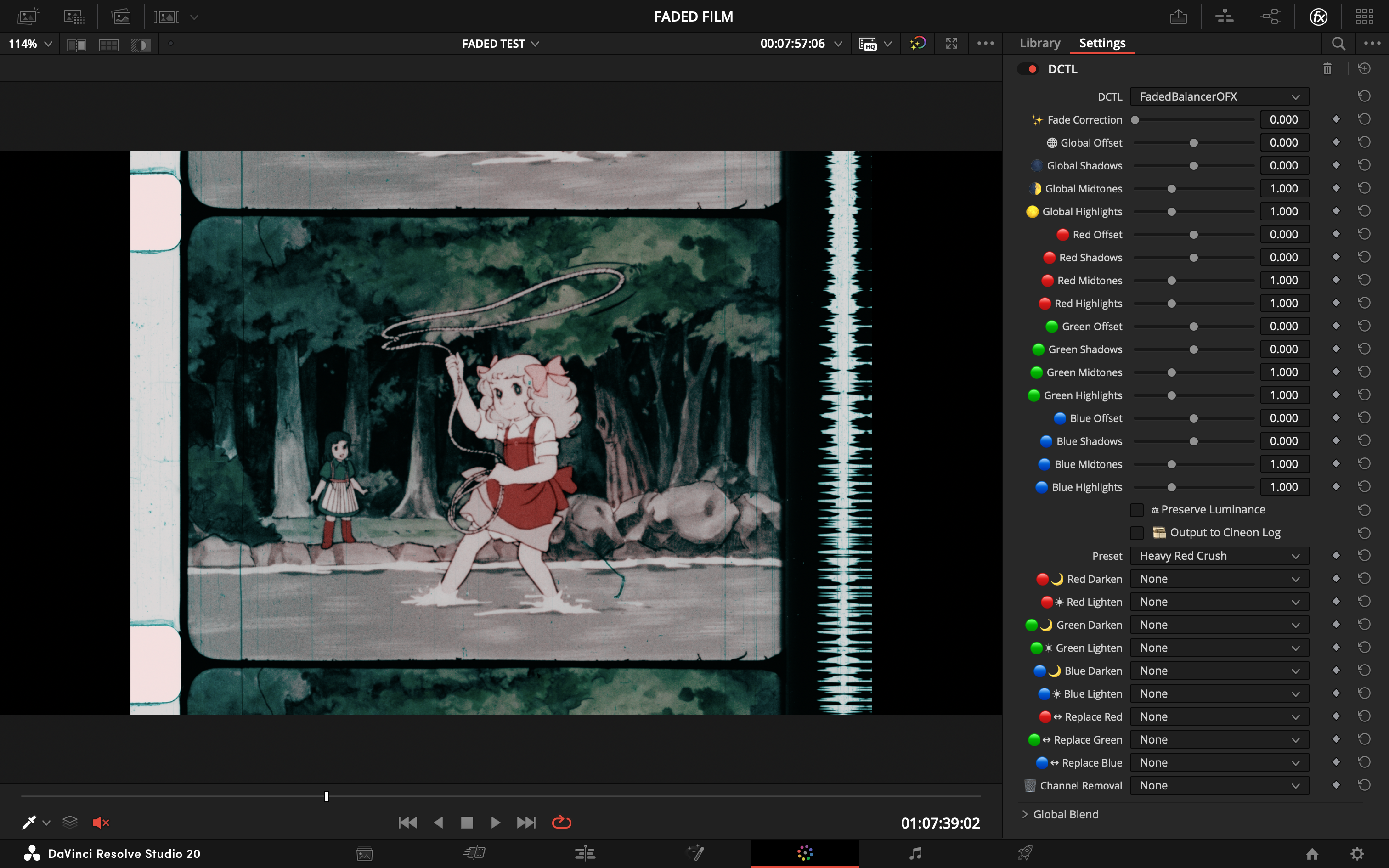 |
Faded Balancer DCTL neutralizing magenta dye fade in Resolve before Nuke ingest.
Reference preparation:
- Clean enough to remove transfer artifacts that would mislead the model.
- For chroma recovery: suppress dust, compression noise, banding (light denoise/deband/median). Geometry changes and temporal warping are not recommended.
- For spatial recovery: remove dust/dirt/scratches only. Do not median filter or blur the reference — preserve all spatial detail (grain, sharpness, edge definition). For magnetic/video references, target only obvious compression artifacts using tools that preserve spatial frequency content.
Geometry/stabilization: prefer cleanup that does not alter geometry. If you must stabilize or reframe, apply identical transforms to both exports.
Resolve Export
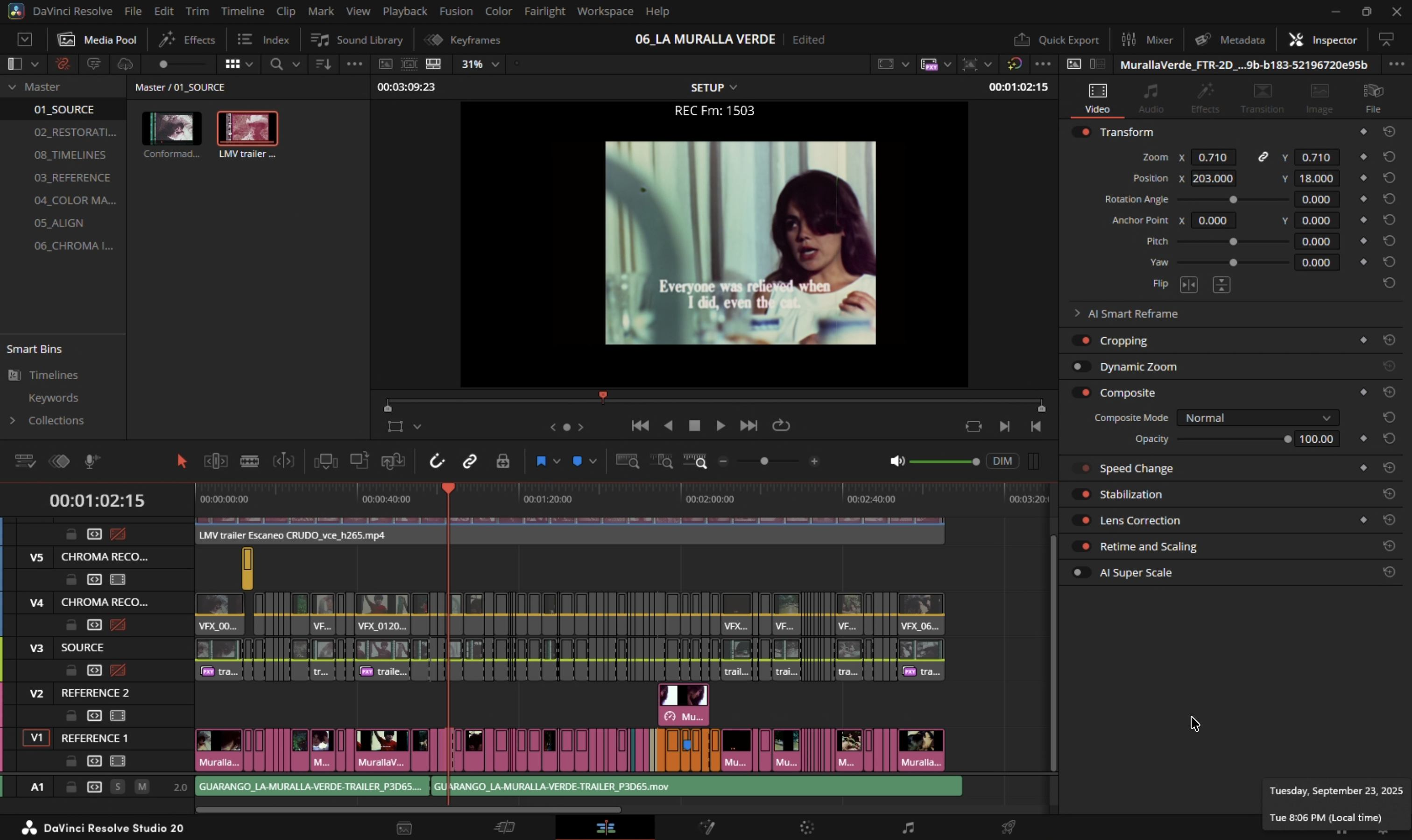 Source and reference placed in the same Resolve container.
- Conform both sources in a single timeline. Disable retimes, effects, and per-clip grades.
- Align the reference to the source in Edit/Inspector (Translate/Scale/Rotate). Allow letterbox/pillarbox; keep stable framing.
- Use ACES project settings. Export both with Rec.709 2.4 ODT to EXR — keeps values bounded in [0–1], which
CopyCatexpects. - Verify parity: resolution, pixel aspect, frame range/rate, channel set (RGB only; omit alpha).
- Note any global offsets (scale/translate/rotate) for later reference.
Rules:
- Same frame range, framing, and resolution.
- No creative grading.
- Fix interlacing, cadence problems, and decode issues before export.
QC checklist:
- Dimensions, frame ranges, and pixel aspect match
- Channel sets match (RGB), values in 0–1 when read into Nuke
- No inadvertent retimes or additional color transforms
Nuke Project Setup
Project settings:
- Color management:
OCIOwithACES 1.2orACES 1.3. - Working space:
ACEScg(scene-linear, AP1). - Viewer process: ACES ODT matching your display (e.g.,
ACES 1.0 SDR-video / Rec.709 2.4).
Read node settings (both Source and Reference):
- Training pairs (from Resolve Rec.709 2.4 ODT):
Read.colorspace = Utility - sRGB - Color Picking. - ACES masters (interchange/comp):
Read.colorspace = ACES - ACES2065-1. If used for training, transform to display-referred (apply Rec.709 2.4 ODT) rather than clamping naively.
Verify:
- Toggle Viewer between Source/Reference; confirm consistent appearance under the chosen ODT.
- Confirm identical ingest transforms on both branches.
ACES and Color Management Reference
Training domain (recommended): Display-referred — export Rec.709 2.4 ODT, ingest via Utility - sRGB - Color Picking, process in ACEScg, build YCbCr ground truth with identical chains. Values are naturally bounded; only light safety clamping needed.
Alternative — Log domain: Viable in theory but significantly slower and, in testing, inferior for chroma recovery fidelity. Use only if footage demands it.
Not recommended — Naive linear ACES clamp: Ingesting ACES 2065-1 and clamping to [0–1] crushes highlights and harms both chroma and spatial mapping. If starting from ACES masters, transform to display-referred first.
Both Input and Target must share the exact same domain and transforms. Do not mix linear and display-referred between branches.
Write nodes (delivery):
- Archival:
Write.colorspace = ACES - ACES2065-1(AP0), EXR 16-bit half (ZIP/DWAA). - Review/proxy: Rec.709 ODT → ProRes/H.264. Document viewing intent and ODT.
Resolve interop:
- ACES 1.2/1.3 project; export ACES 2065-1 EXR masters for Nuke ingest.
- For display-referred training, export Rec.709 2.4 ODT and ingest with
Utility - sRGB - Color Picking. - Keep frame size, PAR, and channels identical.
Stage 1: Dataset Curation
Build a small teaching set from representative frames — do not throw the whole sequence into training.
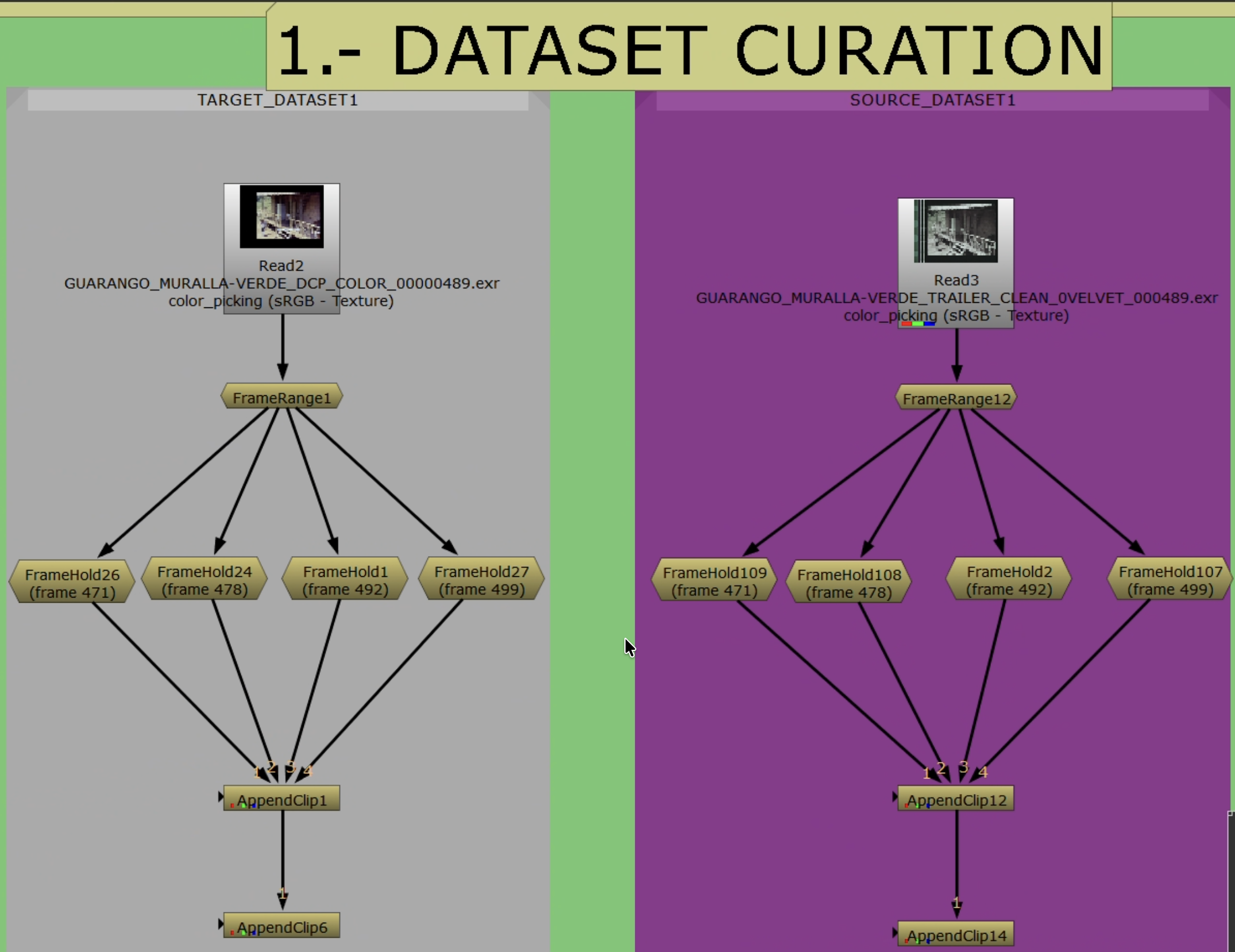 Building paired training examples in Nuke.
Selection Criteria
- Source frames: intact luma/texture, representative grain, minimal gate weave. Avoid motion-blur-dominated frames unless matched in reference.
- Reference frames: same shot/timecode when available, or a well-constructed proxy. Avoid heavy compression, baked-in subtitles/logos, unstable grades.
- Exclude: pairs with occlusions unique to one side (flashes, splice marks) that the model cannot reconcile.
Pair Counts
| Scope | Pairs | Notes |
|---|---|---|
| Shot | 4–9 | Add more if convergence stalls |
| Scene | 12–24 | |
| Sequence | 24–64+ | Scale with variability |
For short ranges (e.g., frames 20–60), anchor at beginning/middle/middle/end.
Coverage
Ensure diversity across:
- Lighting: warm/cool, day/night, interior/exterior
- Subjects: skin tones, foliage/sky, fabrics, neutrals
- Extremes: deep shadows, specular highlights, saturated primaries
- Textures (spatial recovery): fabric, foliage, skin, edges, smooth gradients
Pairing Rules
- Temporal: match same frame index/timecode. If off-by-one, prefer the frame with maximal static structure overlap.
- Spatial: identical resolution/orientation. Overscan/crop must be shared (residual differences handled in Stage 2).
- Color space: both sides under the same transform (e.g., Rec.709 export) so values remain in 0–1.
Nuke Build
- Create a
FrameHoldper selected index on both Source and Reference branches. - Assemble ordered stacks with
AppendClip: one for Source (Input), one for Reference (Target). - Keep a staging
AppendClipupstream of the one referenced by downstreamPostageStampnodes for safe reordering. - Verify each pair with viewer wipe or
Merge (difference)— judge geometry/alignment only, not color. - Label pairs consistently. Maintain a table of indices/timecodes for traceability.
Documentation
- Record shot IDs, pair indices, and rationale.
- Note whether references are direct (telecine/DVD/print) or constructed; cite sources.
- Flag compromises (compression, residual parallax) for review during training.
Stage 2: Alignment
Pixel-accurate alignment with shared crop so branches differ only in the intended characteristic (color or spatial detail).
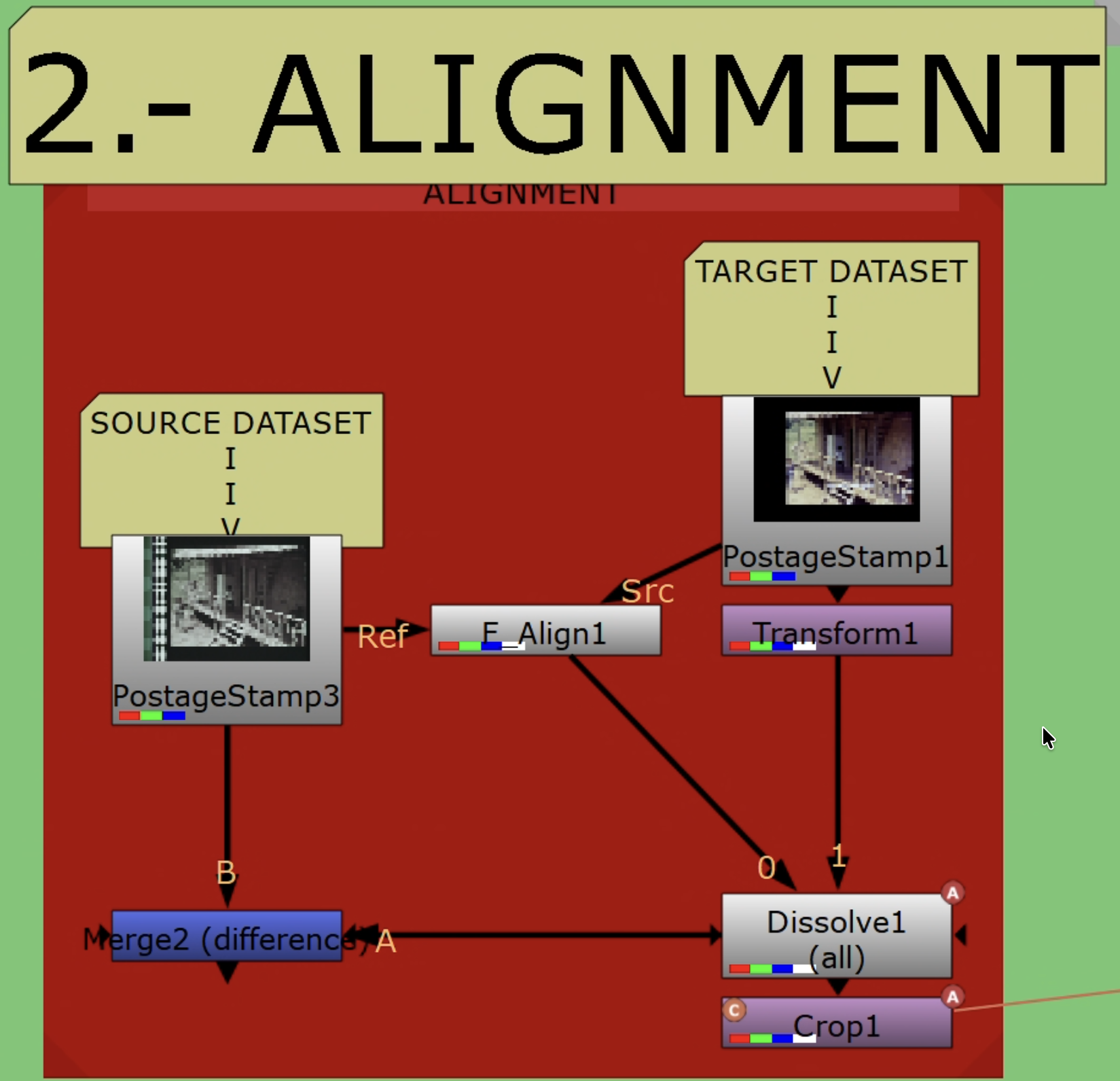 Auto and manual alignment paths inside the template.
Strategy
- Single global solve with
F_Alignusing a conservative central ROI. Do not iterate. - Evaluate immediately with
Merge (difference). If edges/geometry remain, switch to manualTransformwith keyframes. - Keep a
Dissolveto compare auto/manual paths quickly.
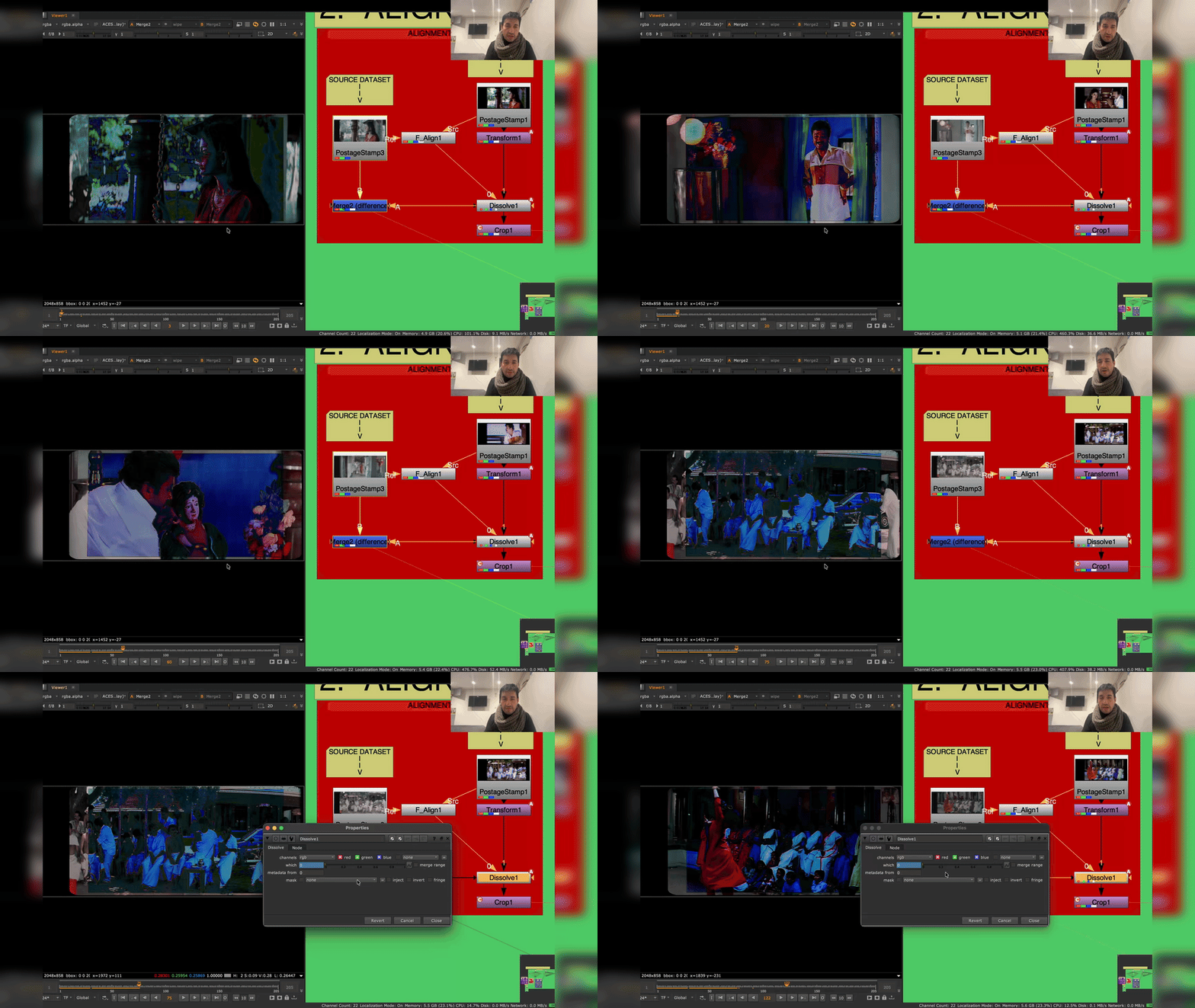 Merge (difference) in the viewer: geometry/edges should be near-black. Visible color differences are expected — only structural misalignment is a problem.
Crop and Subtitle Handling
- Remove black borders/overscan on both branches — do not train on non-image content.
- Exclude burned-in subtitles/logos. Where unavoidable, animate a shared crop.
- Apply the exact same crop to Source and Reference (clone/link) so pixel areas correspond.
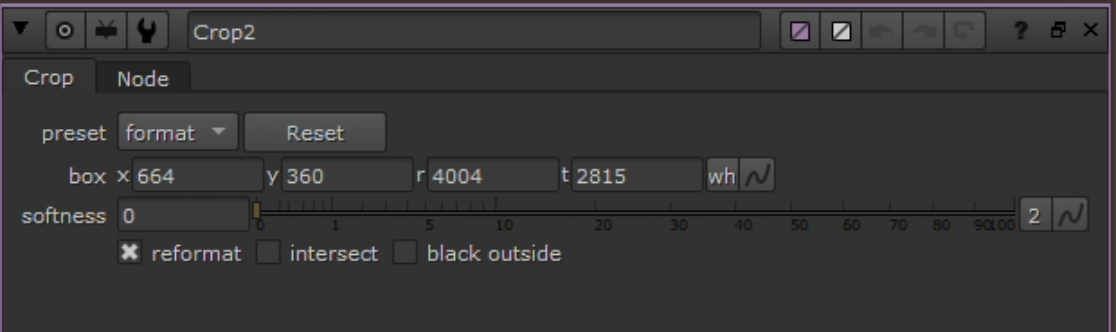 Shared crop keeping both branches in the same live picture area.
Nuke Build
- Compare Reference to Source with Viewer wipe and
Merge (difference). - Use a
Dissolveto switch auto/manual paths. Keyframe per frame (0 = auto, 1 = manual) after inspection. - Auto path:
F_Alignwith conservative central ROI. Single global solve (Translate/Scale/Rotate/Perspective). No parameter chasing. - Manual path:
Transform(translate/scale/rotate) keyed as needed. Judge withMerge (difference). - Reference Crop (last step): add
Cropon aligned Reference to remove overscan/transient overlays. Keep bypassed while solving; enable as final step. Save this node to clone/link in Stage 3. Do not crop Source here.
Verification Checklist
Merge (difference)shows only color/photometric differences; geometry/edges near-black. Do not apply Grade/color correction here.- No edge shimmer at borders/corners when toggling Source/Reference.
- Reference crop removes overscan/mattes without hiding alignment cues.
Troubleshooting: Gate weave/parallax on warped multi-generation references — expect manual Transform keyframing to be time-consuming.
Branch Decision — Stage 3
This is where the workflow diverges. The layout is shared; the branch decision is which channels go into the ground-truth target.
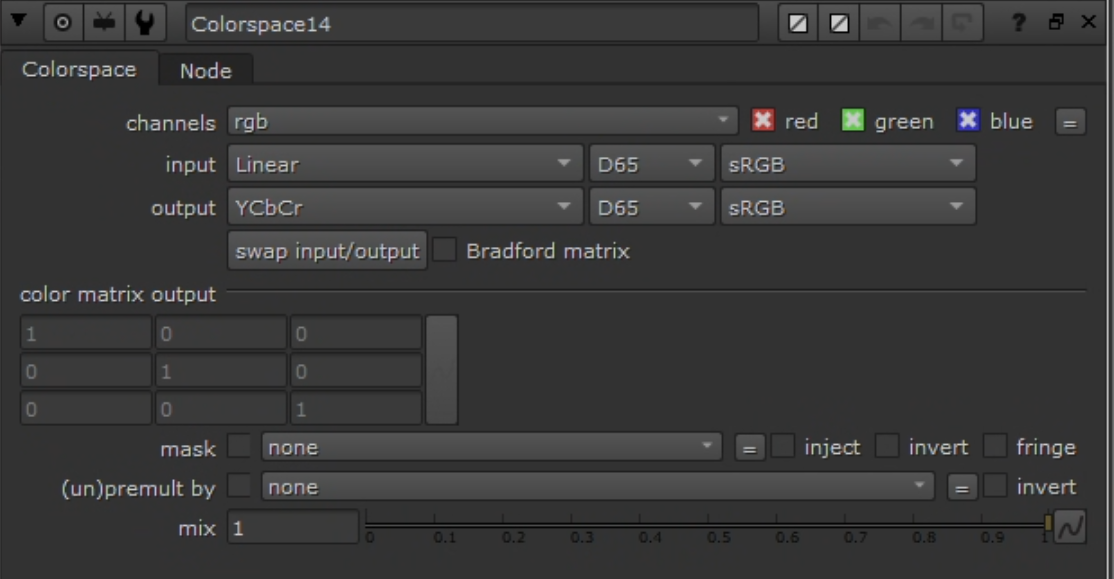 Convert both branches to YCbCr before channel recombination.
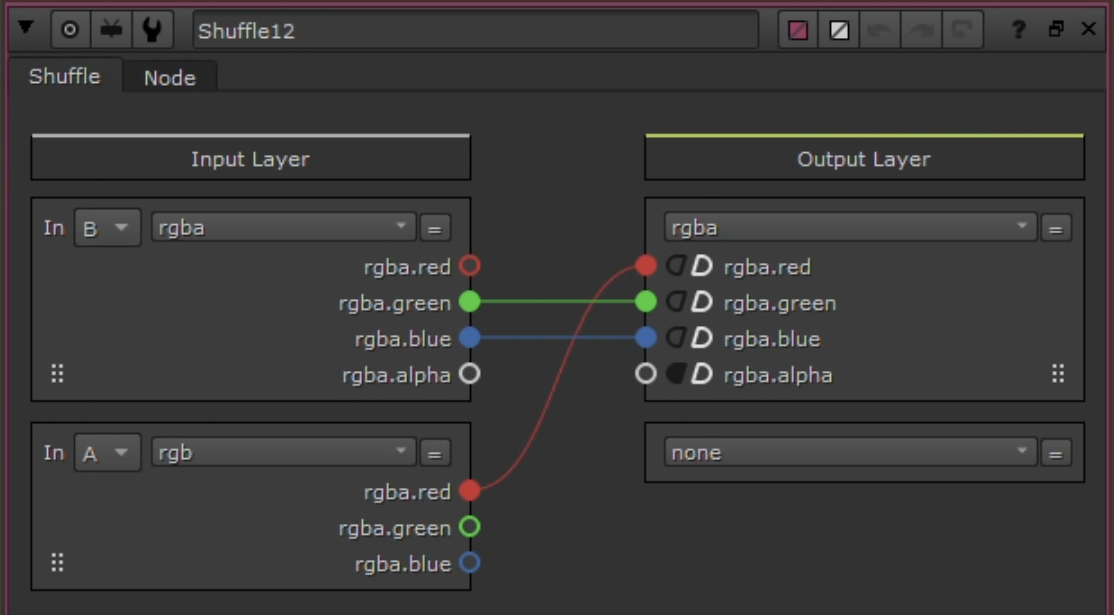 Shuffle node used to build the ground-truth target.
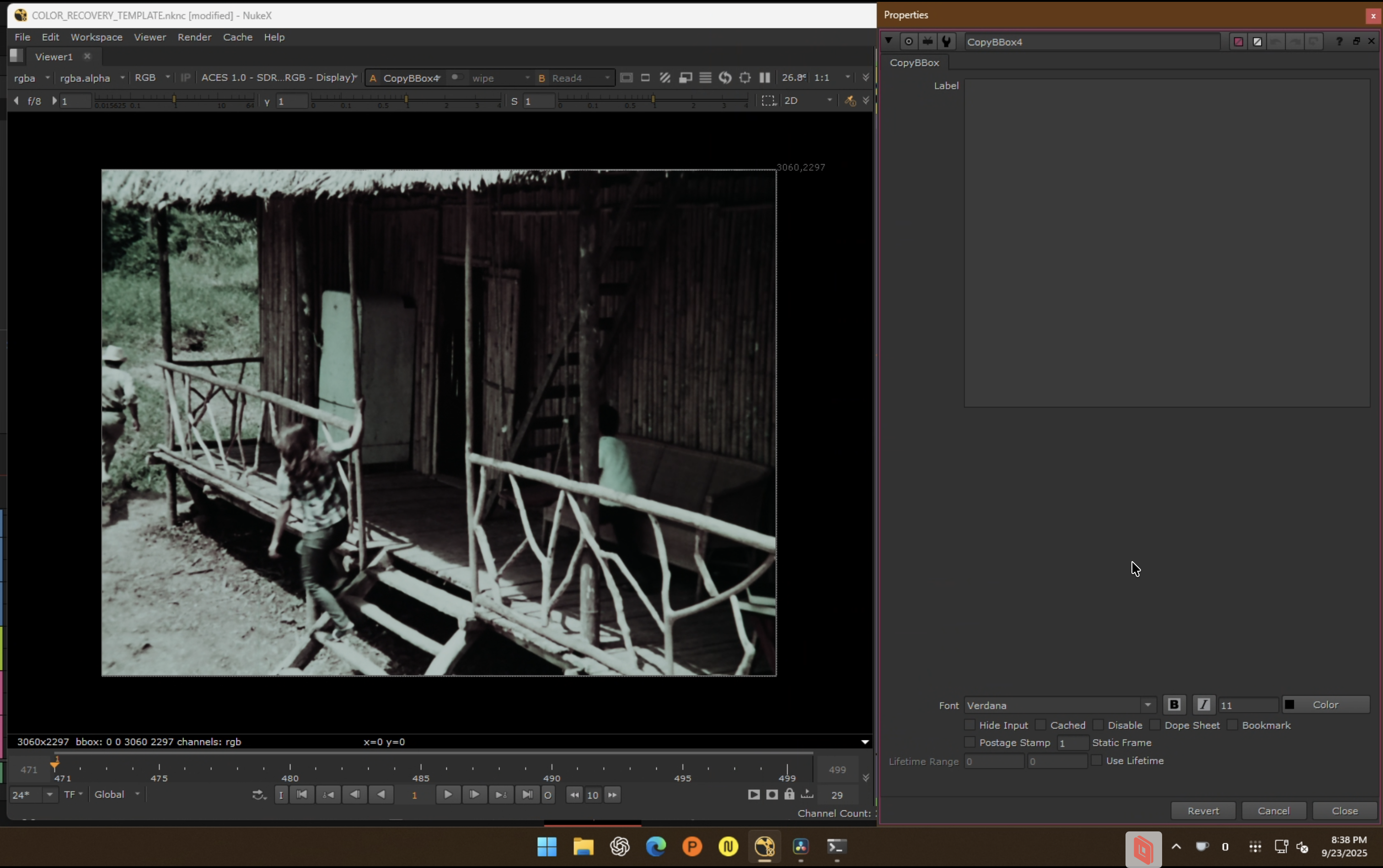 CopyBBox ensures identical bbox across Source and Ground Truth before connecting to CopyCat.
| Branch | Ground truth target | Continue in |
|---|---|---|
| Chroma recovery | Source Y + Reference Cb/Cr | chroma-recovery.md |
| Spatial recovery | Reference Y + Source Cb/Cr | spatial-recovery.md |
Rules After the Branch
- Do not combine chroma and spatial recovery in the same target build.
- Validate one pass before attempting the second.
- Train sequence-level first; split to shot-level only where the wide pass fails.
- Run inference on the full source, not just training frames.
- Compare against a baseline (
MatchGrade) to prove the model is doing something specific.
Common Failure Modes
- Training on an unstable source (flicker, dirt, severe imbalance).
- Trusting a bad reference just because it is higher resolution.
- Keeping misaligned frames in the dataset.
- Leaving borders, subtitles, or overlays inside the training area.
- Expecting one model to solve every shot in a difficult sequence.