Chroma Recovery — Stages 3–5
 Chroma recovery comparison (Candy Candy).
Prerequisites: Complete Stages 0–2 first (Resolve export, Nuke setup, dataset curation, alignment, shared crop).
This guide covers chroma-specific target construction, training, inference, and validation. The model learns to reconstruct chroma (Cb/Cr) from paired frames while preserving source luma and spatial detail.
When to Use Chroma Recovery
- Chromogenic film stocks with dye fading (Eastman Color, Fuji, Agfa magenta shifts)
- Color negatives with degraded color layers
- Historical material requiring color reconstruction
- Films with inconsistent color across scenes due to degradation
Traditional grading manipulates existing channels — it cannot learn color from external references. CopyCat overcomes this with supervised pairs.
Reference Approaches
| Approach | When to use | Notes |
|---|---|---|
| Reference-based | Direct color reference available (DVD, telecine, print) | Highest fidelity; align to faded source as ground truth |
| Non-reference | No direct reference exists | Research period-accurate palettes; synthesize plausible references; document all assumptions |
These are complementary and can be mixed per shot or scene.
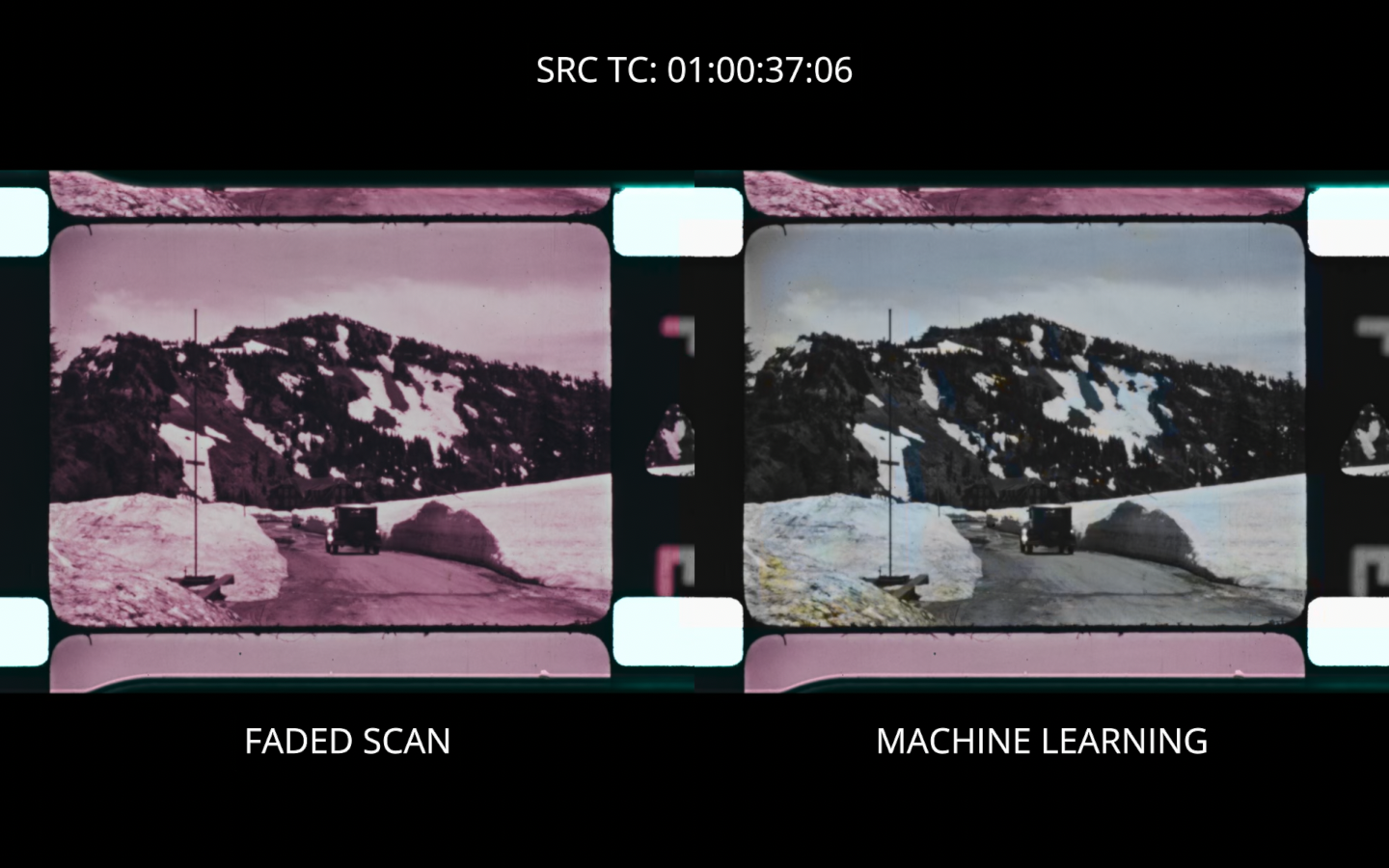 Non-reference recovery: faded scan (left) vs. ML output trained on a constructed reference (right).
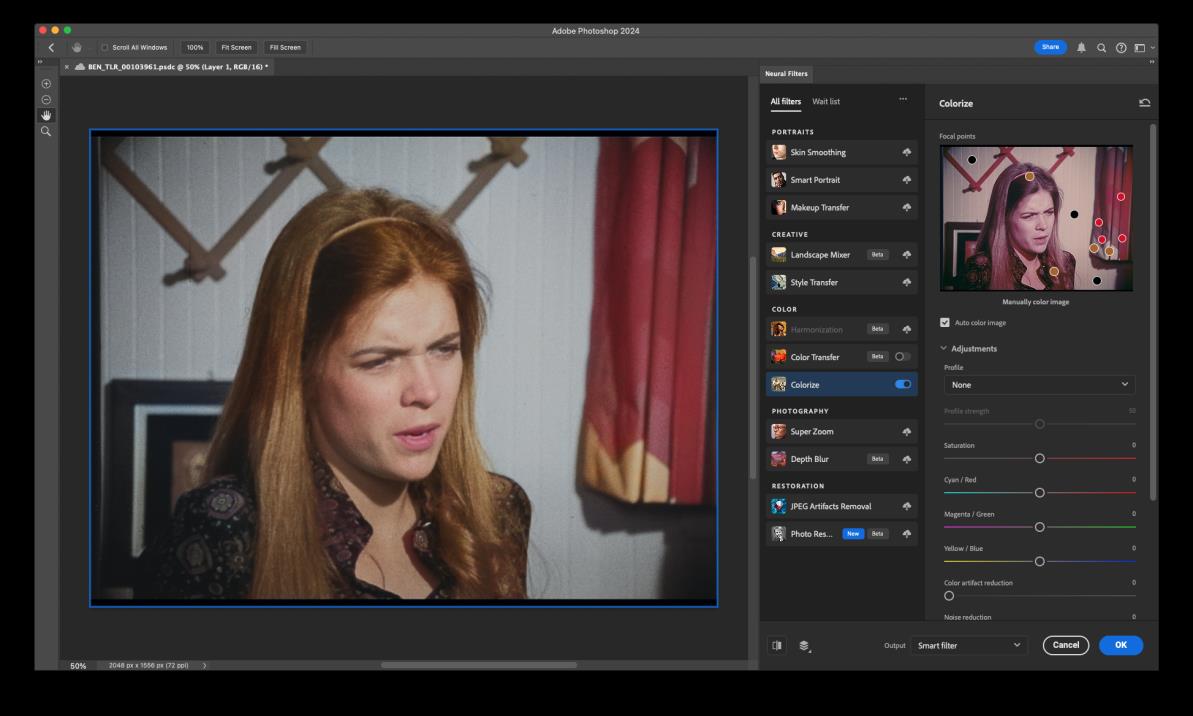 Constructing a color reference with Photoshop Neural Filters (Colorize) when no direct reference exists. Focal points guide the colorization. Document all assumptions — this is synthesized, not archival.
Stage 3: CopyCat Training — Chroma Target
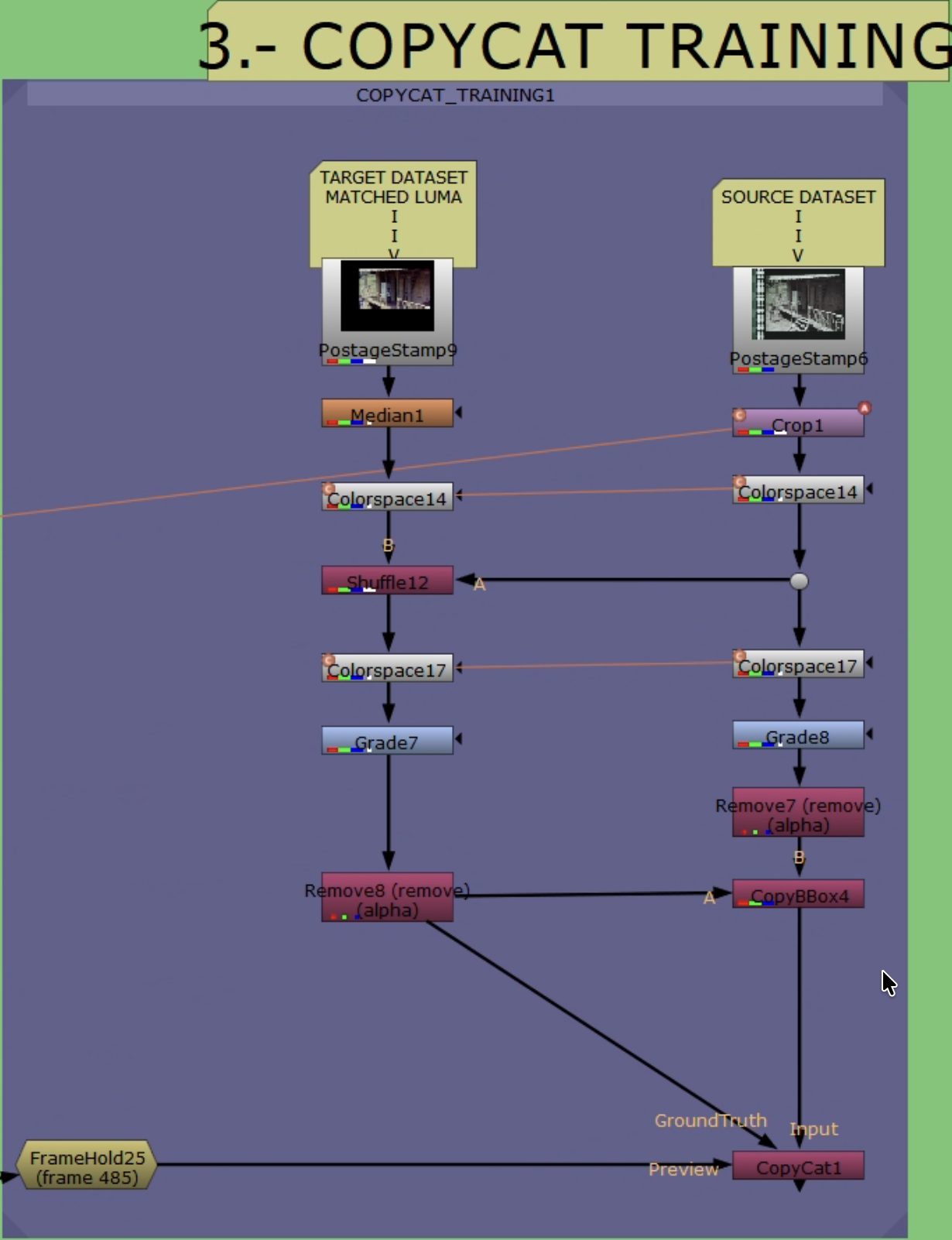 CopyCat training workflow with YCbCr channel manipulation.
Training Pair Build
- Reference pre-filter (optional):
Median(~size 10) to suppress dust/compression. For magnetic/video references, consider light debanding. - Apply linked Crop to Source: clone/link the Stage 2 Reference
Croponto Source so both paths share identical picture area. Do not add a new Crop to Reference (it already has one from Stage 2). BBox parity is enforced in step 8. - Convert both branches to YCbCr:
Colorspace(Working → YCbCr) on Source and Reference.
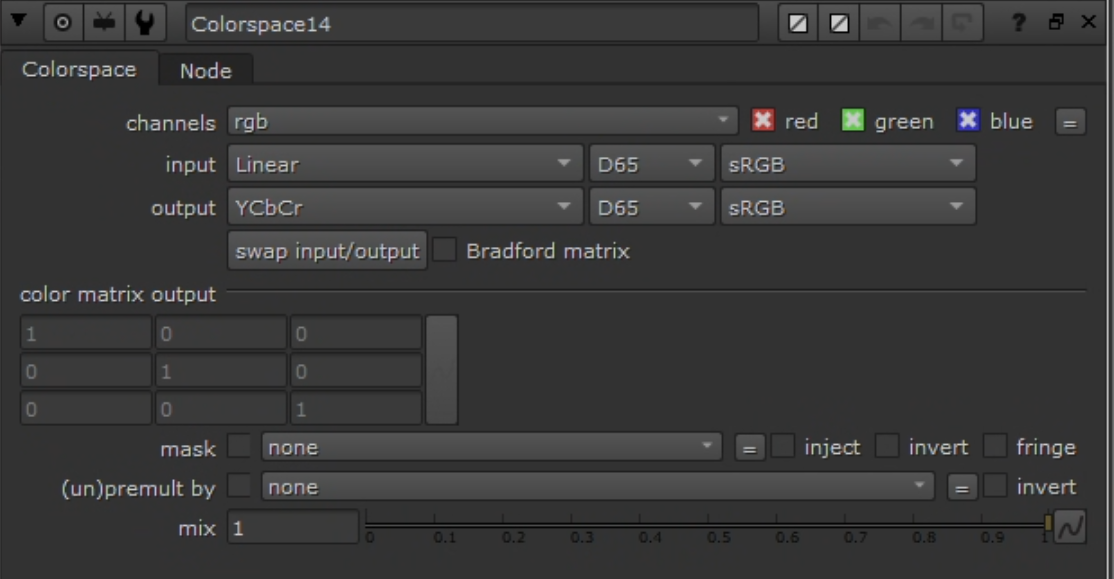 Colorspace node: Linear → YCbCr.
- Build ground truth with
Shuffle:- Goal: Ground Truth = Source luma (Y) + Reference chroma (Cb/Cr).
- Inputs: A = Source (YCbCr), B = Reference (YCbCr)
- YCbCr packing in Nuke: red = Y, green = Cb, blue = Cr
- Channel mapping:
- red ← A.red (Y from Source)
- green ← B.green (Cb from Reference)
- blue ← B.blue (Cr from Reference)
- alpha ← black
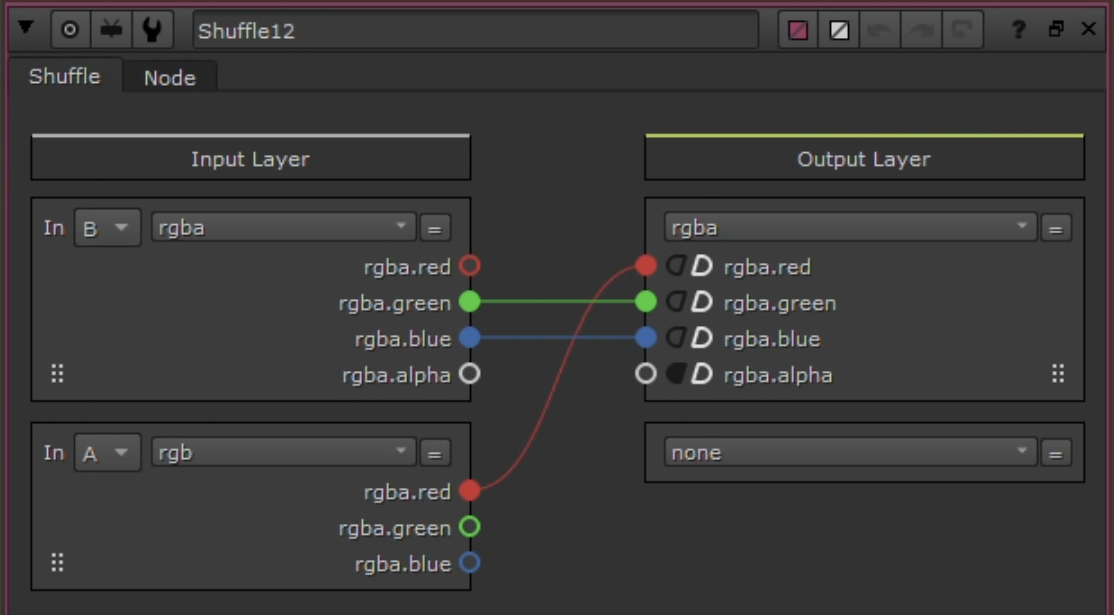 Shuffle: Source.Y + Reference.CbCr.
- Convert ground truth back:
Colorspace(YCbCr → Working).
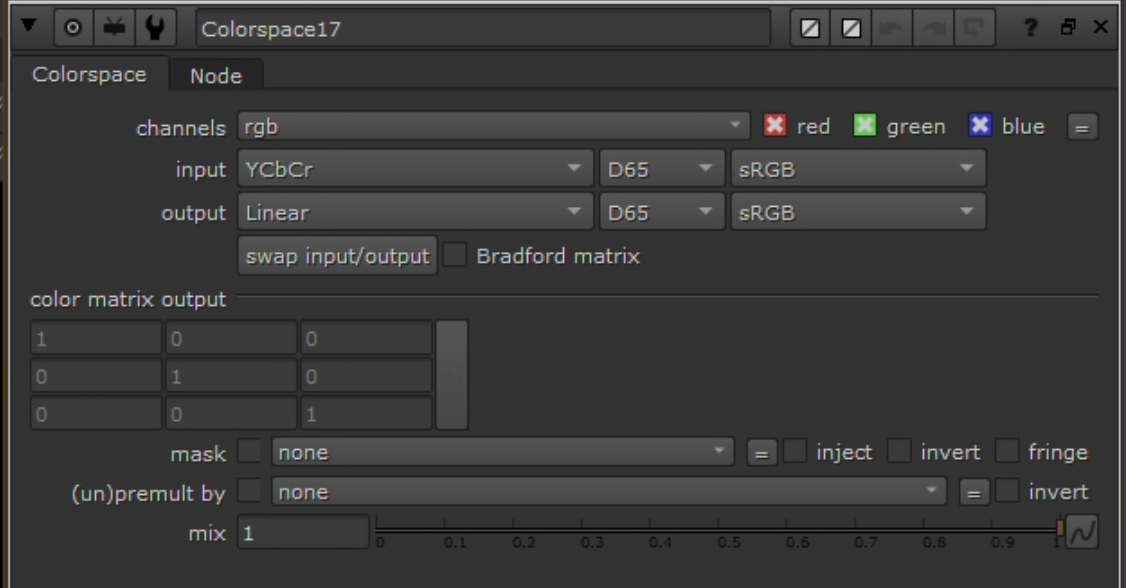 Colorspace node: YCbCr → Linear (reverse conversion on Ground Truth).
- Clamp:
Gradeon both Input and Ground Truth — enable black/white clamp to [0–1]. - Remove alpha:
Removenode to drop alpha on both. - Copy bbox:
CopyBBox/SetBBox— copy bbox from Reference to Source and Ground Truth. - Connect to
CopyCat: Input = Source (post clamp/remove/bbox), Target = Ground Truth (post clamp/remove/bbox). Only chroma differs.
Hyperparameters
| Parameter | Value | Notes |
|---|---|---|
| Model | Medium | Start here; increase to Large only if quality insufficient |
| GPU | Enabled | Apple Silicon or NVIDIA |
| Patch | 512 | Use 256 if crop-limited; increase steps accordingly |
| Batch | 3 | Fixed for predictable behavior; tune only if VRAM constrained |
| Steps | 40–80k | If patch = 256, increase proportionally |
| Checkpoints | Every 10k | |
| Contact sheets | Every ~100 steps | Visual convergence monitoring |
| Learning rate | Default | Optional cosine decay after warmup |
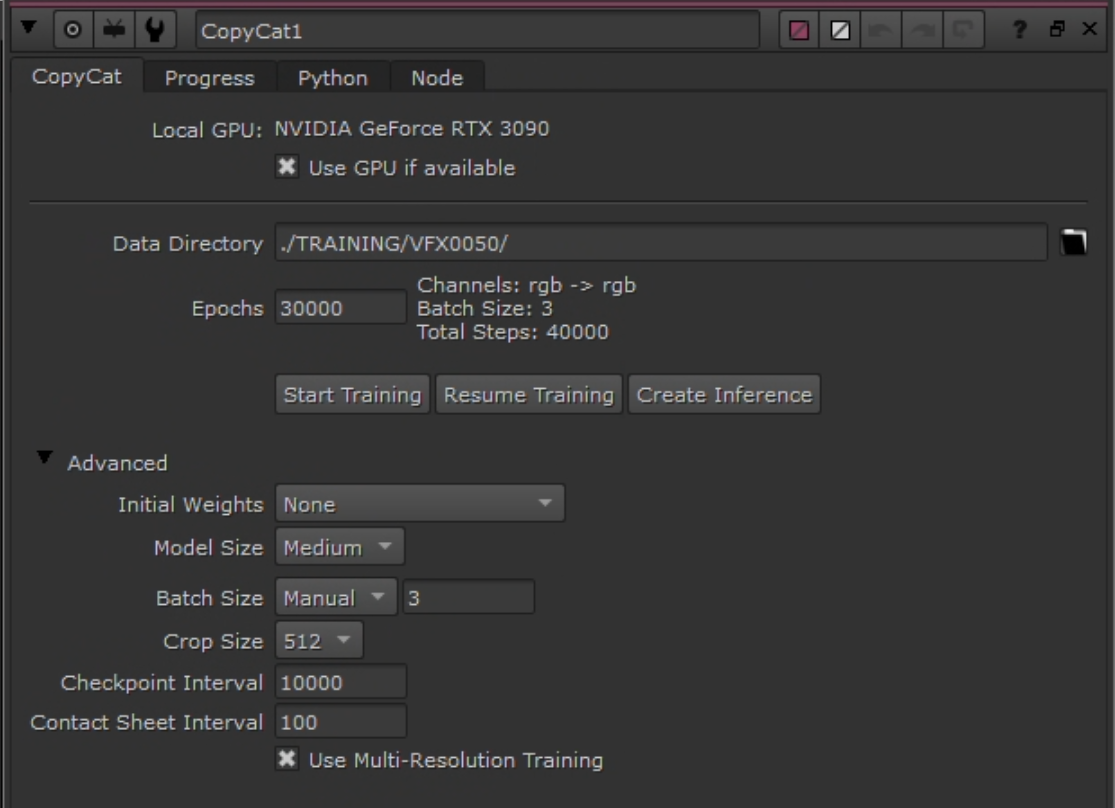 CopyCat node configuration.
Augmentations
- Geometric: small translate/scale; horizontal flip if composition allows. Avoid rotation if alignment is tight.
- Photometric: mild exposure jitter (±0.1). Avoid color transforms that alter chroma relationships.
Preview Input
Use CopyCat’s preview input with a frame not in the training dataset to monitor generalization during training. Select a frame with representative lighting/subjects. Check at each checkpoint (every 10k steps).
Monitoring
- Track loss progression; observe contact sheets for visual convergence.
- Luma identity: convert both to YCbCr, difference Y — expect near-zero.
- Range: confirm clamping prevented <0 or >1 values.
- BBox: confirm identical bbox on both streams.
 Contact sheet progression from Step 1 → 360,000 (Candy Candy chroma recovery). Each row shows input (left) / ground truth (center) / output (right) for a different crop. Output starts as noise and progressively converges to match ground truth color. 17 milestones shown: 1, 100, 300, 500, 1k, 2k, 3k, 5k, 7.5k, 10k, 15k, 20k, 30k, 60k, 100k, 200k, 360k steps.
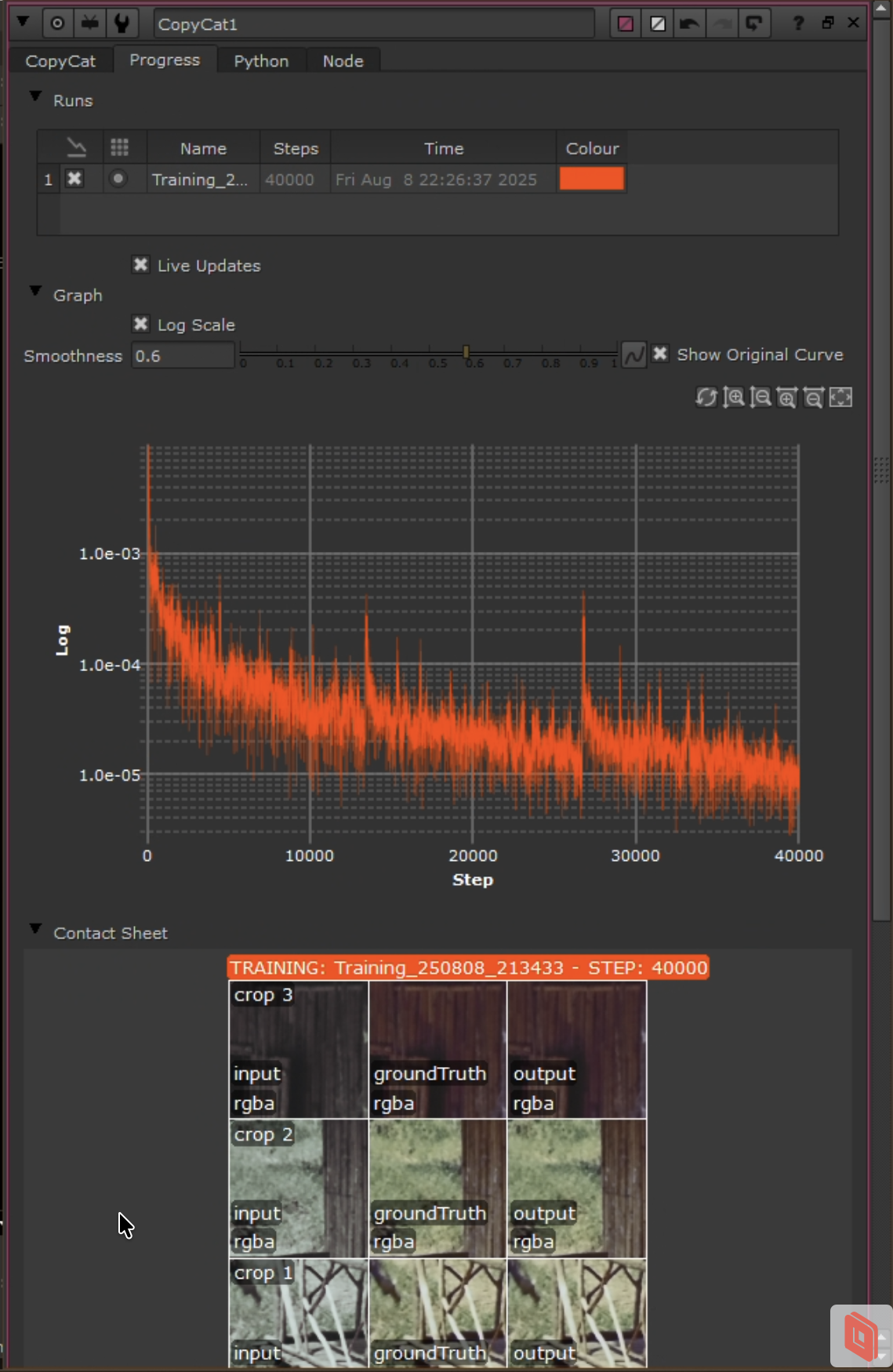 Progress tab in CopyCat UI showing loss curve and contact sheets.
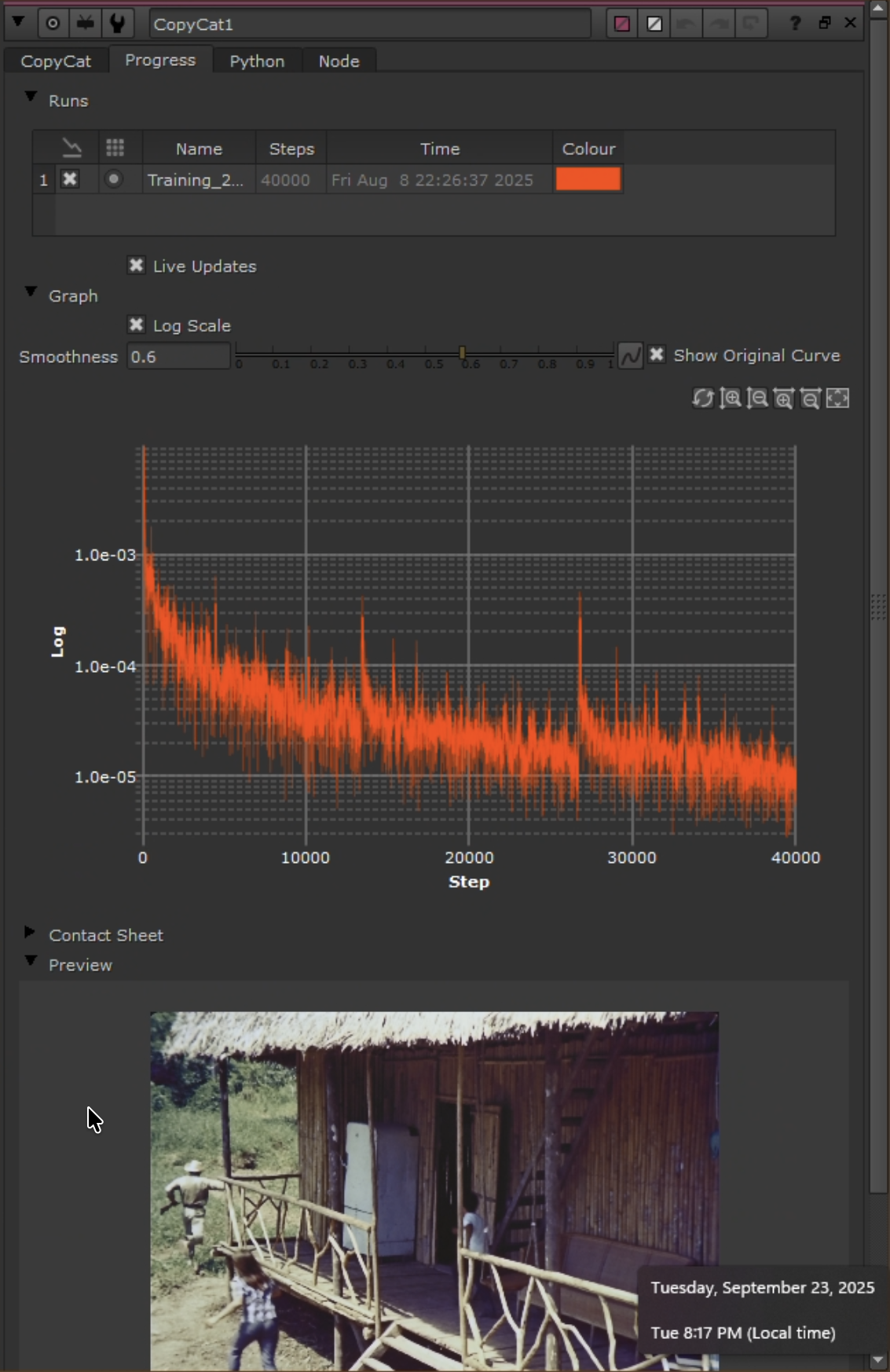 Preview tab showing loss curve and real-time preview on a held-out frame.
Stage 4: Inference and Render
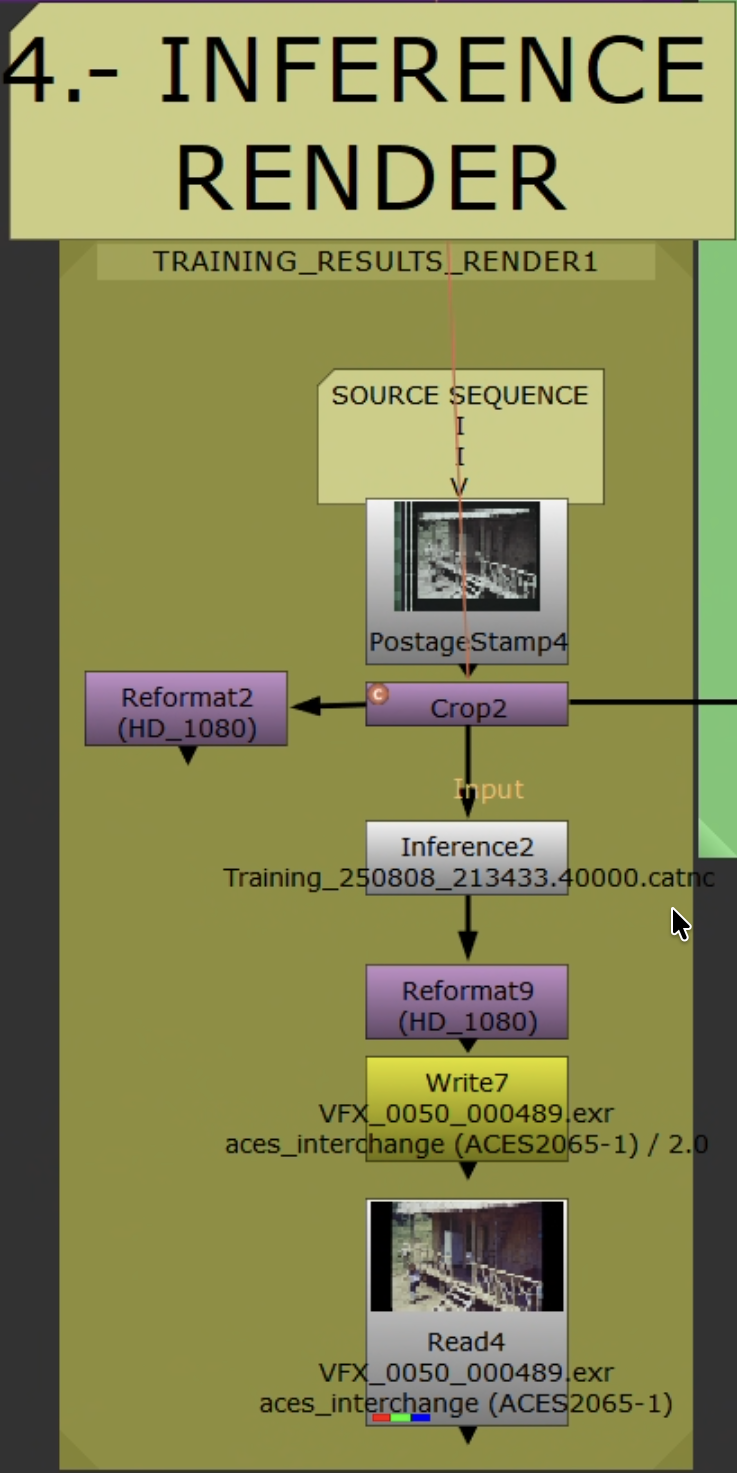 Inference workflow applying trained model to full sequence.
Train small, infer big. Training uses curated single-frame pairs. Inference runs on the full shot/scene/sequence.
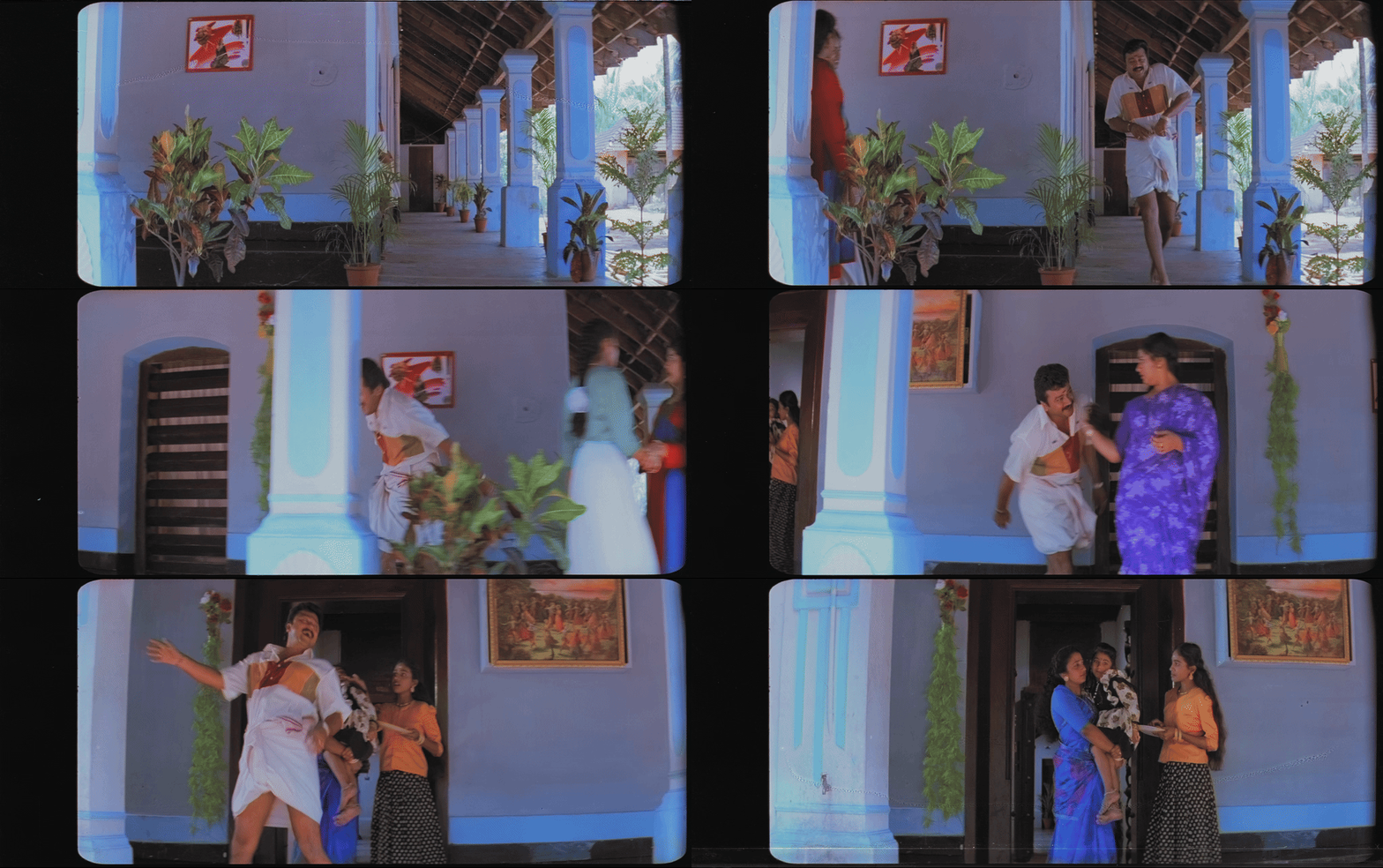 Inference output playing back on the full sequence — model generalizes beyond training pairs, maintaining temporal consistency across frames.
Steps
- Read original Source. Set
Read.colorspaceto match training ingest domain. - Add live-area
Crop(remove sprockets/sound strip). Do not carry over Stage 2/3 crops/transforms. Ensure picture area matches training. Do not add grades, clamps, or alpha ops. Inferencenode: load trained.catmodel. Same patch/tiling settings as training.- Convert to delivery space as required. Reformat/pad as needed.
- Validate on 50–100 frames first before full render.
Output Settings
- NukeX Non-Commercial: limited to 1920×1080 — use for previews only.
- Archival: Nuke Indie/Full. EXR 16-bit half (DWAA/ZIP),
Write.colorspace = ACES - ACES2065-1.
Render Settings
| Setting | Value |
|---|---|
| Container | EXR (ZIP or DWAA) |
| Bit depth | 16-bit half |
| Colorspace | ACES 2065-1 (AP0) or project archival standard |
| Naming | Include shot/scene, version, model/checkpoint ID |
Outlier Review and Iteration
- Scrub rendered range. Flag: hue drift, chroma bleed at edges, unstable skin tones, flicker, banding.
- Add flagged frames as new pairs (
FrameHoldon both Source/Reference). UpdateAppendCliporder; keep held-out validation frames. - If artifacts are localized, confirm live-area
Cropexcludes them. Refine Reference cleanup (light Median/deband) if needed. - Retraining: increase pairs (4 → 7 → 11) targeting missing color families. Extend steps/checkpoints. Reduce photometric augmentations if chroma is unstable.
- Retrain from best checkpoint or fresh. Re-infer short validation range. Iterate until acceptable, then render full sequence.
QA
- Check first/last frames and shot joins for seams or crop mismatches.
- Spot-check skin tones, saturated colors, deep shadows.
Stage 5: Validation
Resolve Validation
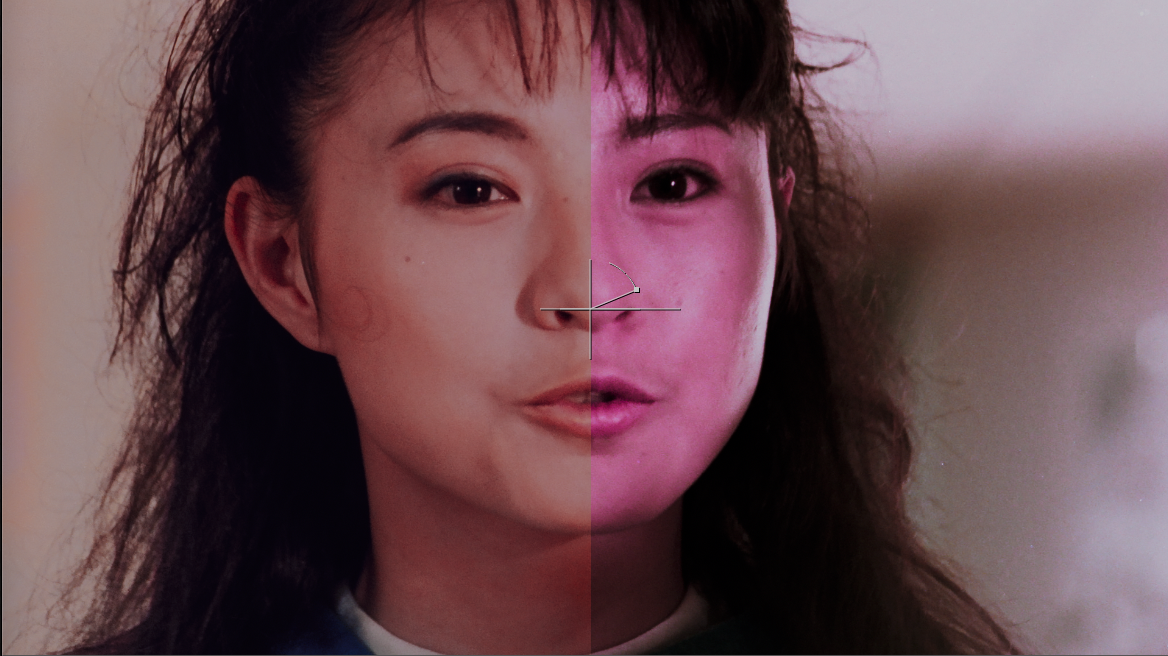 A/B split (Mission Kill): faded source (left) vs. chroma recovery output (right). Skin tones and color saturation recovered from dye-faded print.
- Import Original (Source) and Recovered (Inference output) into the same ACES-managed Resolve project.
- Stack on separate tracks. Align timecode/frames. Disable all clip grades/effects.
- Viewer wipe or split-screen. Toggle track visibility for A/B.
- Scopes: waveform (Y) for luma stability; vectorscope for balanced chroma (skin line, saturated primaries, neutrals).
- Note outliers for Stage 4 iteration.
Resolve Composition (Chroma Merge)
Integrate only new chroma while preserving original luma detail and grain:
- Edit page: Recovered on V2 above Original on V1. Set V2 Composite Mode =
Color. - Color page: Layer Mixer, Composite Mode =
Color(Recovered over Original). - Keep ACES-managed. No additional grades.
MatchGrade Baseline (Optional)
Produce a LUT baseline: Log pre/post transforms → MatchGrade 3D LUT → back to Linear. Compare vs. Recovered to visualize the difference between LUT mapping and learned chroma reconstruction.
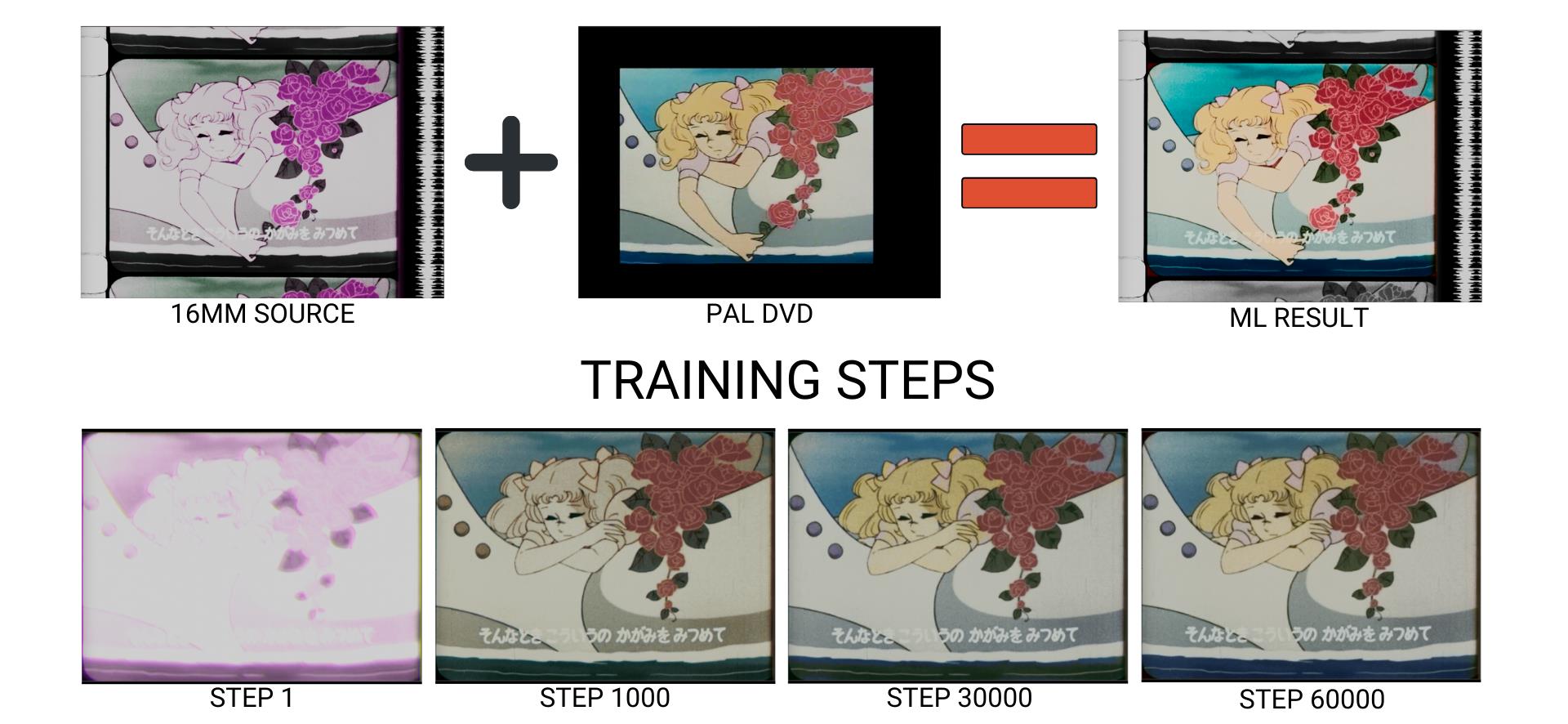 Training progression: Step 1 → 1000 → 30000 → 60000. Color is progressively reconstructed from the faded source using the PAL DVD reference.
 4-way comparison (Friends): Original Scan (faded) → Balanced & Cleaned → Video Reference → Machine Learning Output.
Acceptance Criteria
- Luma matches within tolerance.
- No visible artifacts.
- Color consistent within scene.
- Clear improvement vs. MatchGrade baseline.
Delivery
- Save model/checkpoint ID, dataset indices, validation stills.
- Deliver EXR masters + concise validation note (assumptions, references, caveats).
Troubleshooting
| Problem | Solution |
|---|---|
Residual misalignment in Merge (difference) | Switch to keyed Transform; keyframe for warped material. See Stage 2. |
| Convergence stalls | Add pairs covering missing color families (skin, foliage, sky, neutrals, extremes). Extend steps. Reduce photometric jitter. |
| Color bleeding, desaturation, wrong hue | Verify Shuffle mapping (Source.Y + Reference.Cb/Cr). Confirm [0–1] clamping. Check identical crops/bbox. Reduce model size or steps if overfitting. |
| Flickering or inconsistent color across frames | Expand pair coverage near lighting transitions. Re-evaluate crops for transient overlays. Check alignment consistency. |
| Detail loss | Ensure Source luma (Y) is preserved in ground truth. Verify Shuffle: Source.red → Ground Truth.red. |
| Model sizing | Start Medium. Increase to Large only after proper dataset curation and alignment. Small = faster but less detail retention. |